PICK YOUR NEXT STOP
Your island activity booklet
STOP 01
Choose a small attraction of your own
Asciilands Solo is a change of pace from Frankie's puzzle rooms. Instead of following a scripted tour, you choose a small island activity: find materials, make a tool or arrange a camp. There is no required order for enjoying the scenery, and you can make a short visit useful by choosing just one finished task.
The embedded game is Quietwater, an independent single-player development edition inspired by Asciilands. It is not the original shared multiplayer world, and it does not provide a party lobby or player trading. Think of this page as a personal activity booklet for the solo version that actually opens in the player.
Pick an activity before pressing ahead. A curious first visit might focus on learning movement and gathering one resource. A workshop visit might finish a workbench and tool. A decorating visit might arrange a few building pieces. Those choices help a new interface feel manageable without pretending that there is a timed attraction to complete.
STOP 02
Stop one: get comfortable with the controls
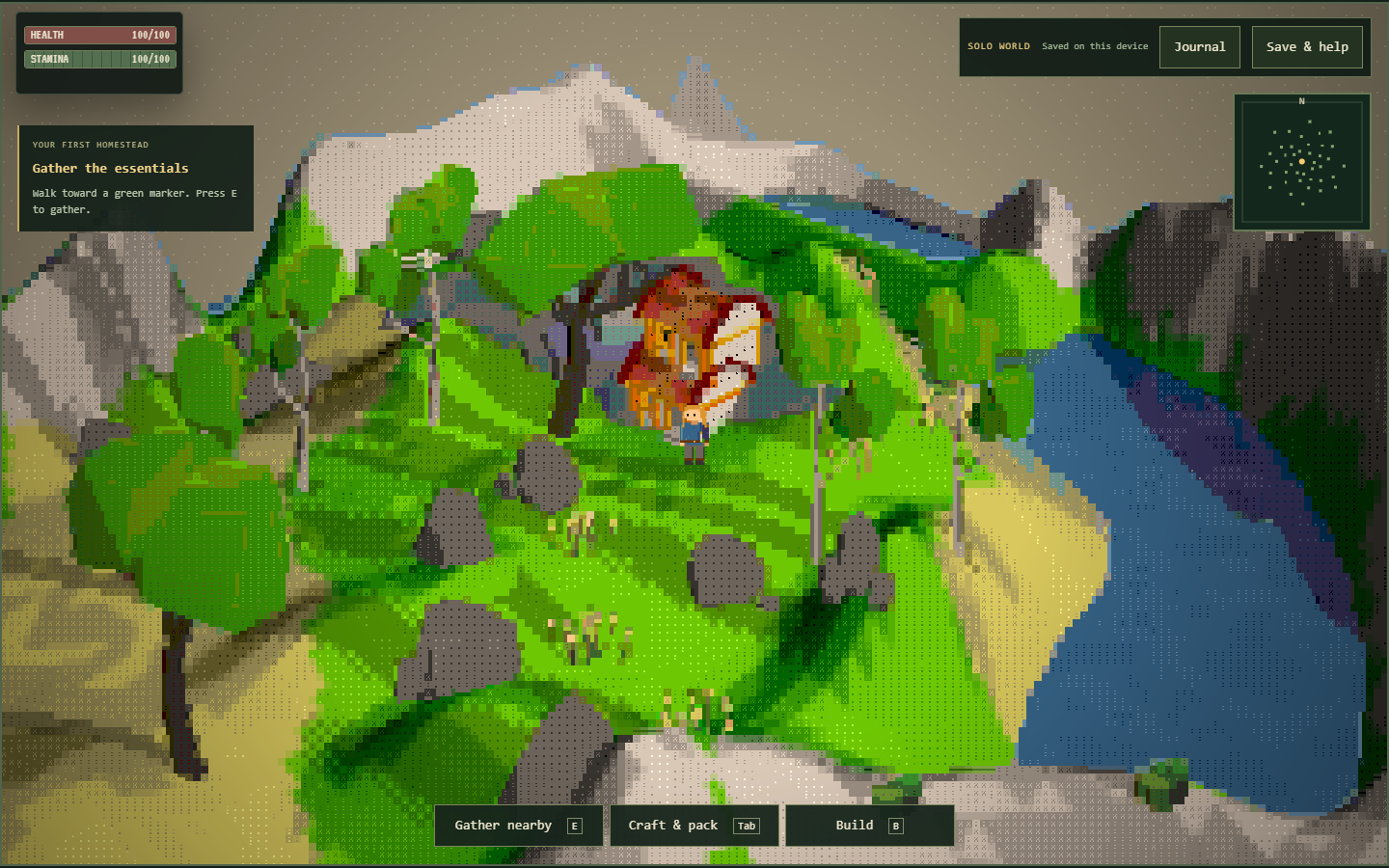
On a keyboard, use WASD to move and Shift to run. Walk close to a resource marker and press E to gather. If nothing happens, check your distance and the feedback. The ASCII scenery includes decorative characters, so a visible tree-like shape is not always the same thing as an active collection point.
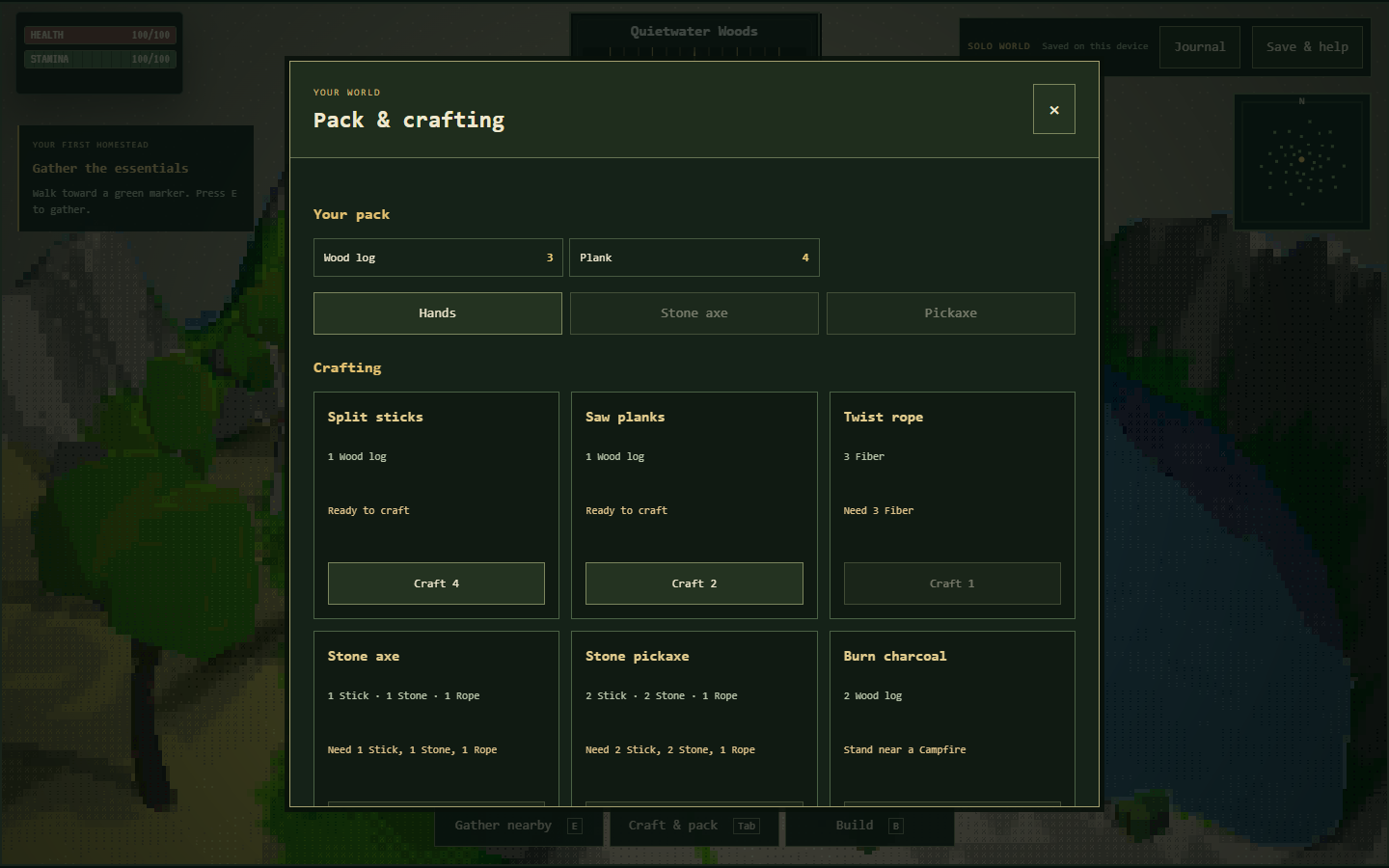
Tab opens the pack and crafting interface, B enters building, and J opens the journal. Escape closes or cancels interfaces. Try those controls one at a time while standing somewhere easy to recognize. Learning how to leave a panel is just as helpful as learning how to open it.
Touch movement and action controls are included for smaller screens, although physical-device performance can vary. Give the game enough screen space to distinguish the buttons. If the keyboard starts controlling the webpage instead of the character, return focus to the player before trying the same movement again.
STOP 03
Stop two: take a short gathering walk
Look for wood, stone and fiber during your first loop. These materials connect to several early recipes, which makes the walk useful even before you have chosen a larger camp design. Return to a familiar place after collecting a small amount so that the first trip feels like a completed activity.
Open the pack and compare its contents with what you expected to gather. Watching the inventory change helps you learn which objects are interactive. Some nodes run out temporarily and replenish during active play, so an empty source is a reason to explore nearby, not necessarily a sign that the world has stopped working.
Berries and fish can be part of a collecting visit too. However, this edition does not implement hunger or combat survival. You do not need to invent a food emergency while learning the controls. Gather those items because you want to try a recipe or recognize another resource, rather than because a hidden timer demands it.
STOP 04
Stop three: make your first workshop
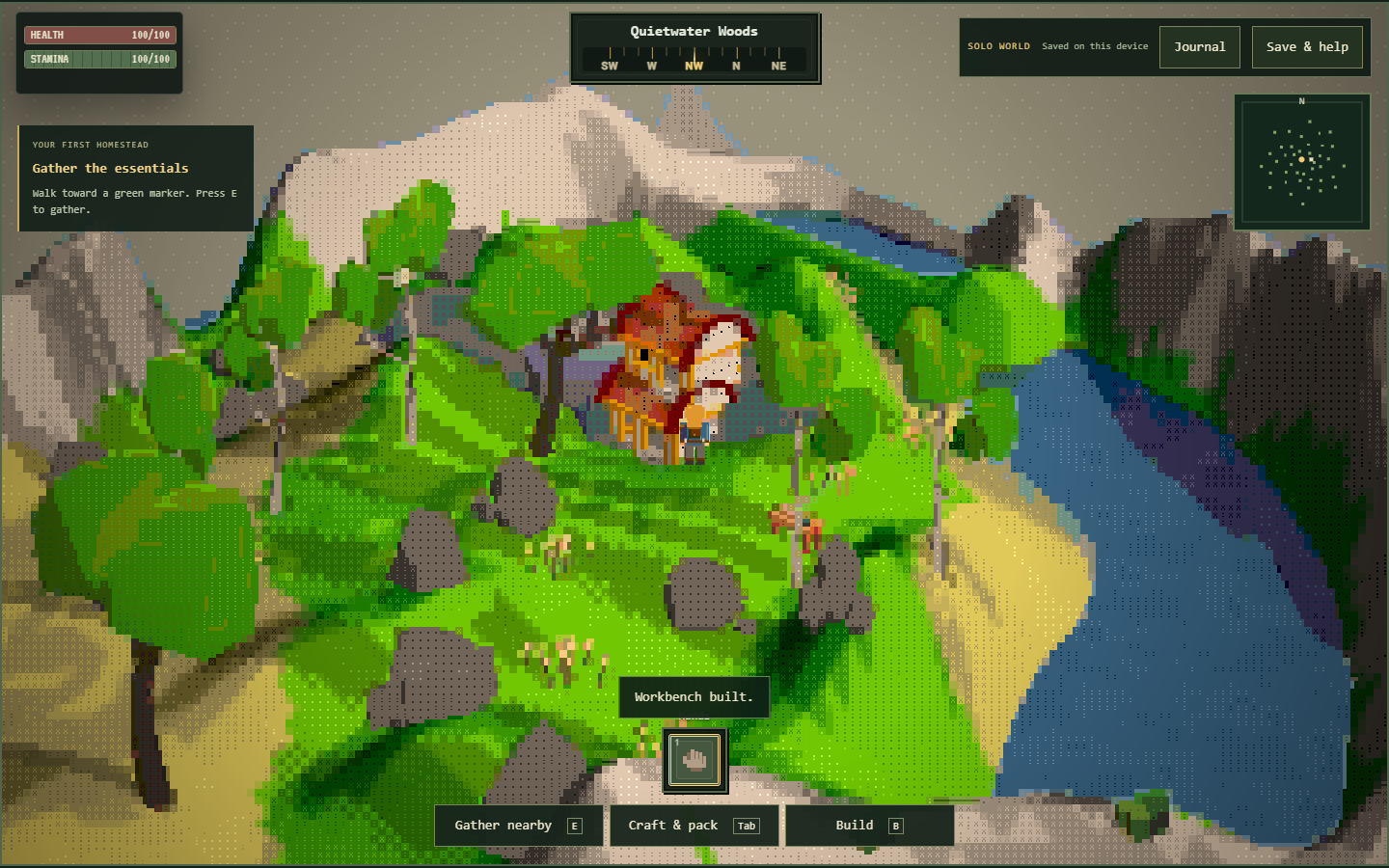
Two logs can become four planks because each log produces two. Four planks are enough for a workbench. Craft those ingredients in the pack, open building with B, and choose a clear nearby location. This gives you a simple first project with a result you can see in the landscape.
The workbench is useful only as a nearby station after you place it. Carrying the planks is preparation, not completion. When a recipe requires the bench, walk close to the placed object and try from there. If the recipe still fails, inspect its ingredient list rather than placing another bench immediately.
Keep a little open space around the workshop so you can return easily. There is no prize for making the first arrangement complicated. A bench that is easy to find and approach is a good base for the next activity, especially while you are still learning how to read the unusual ASCII view.
STOP 05
Stop four: try a tool-making activity
To make rope, combine three fiber. A log produces four sticks. Near the workbench, one stick, one stone and one rope make a stone axe; two sticks, two stone and one rope make a stone pickaxe. Choose the tool that fits the resource you want to collect next.
After crafting, open the equipment controls and equip the tool. The axe improves wood gathering, while the pickaxe improves stone gathering and permits iron ore collection. Simply owning the item does not meet every use requirement. This is the first thing to check if your new tool seems to make no difference.
You can stop after one tool. The point of this activity is to understand the sequence from raw material to ingredient to equipped item. Once that sequence feels familiar, repeating it for another recipe becomes easier. Keep leftover sticks for later rather than assuming that a recipe batch must be used up immediately.
STOP 06
Stop five: arrange a little corner
Building pieces let you give your chosen spot a recognizable shape. A foundation uses four planks, a floor uses two, and a wall or doorway uses three. Roof pieces cost four planks. Start with a small arrangement and inspect each placement before spending the rest of your wood.
The decorative chest costs six planks but does not function as storage. Add it if you like the appearance, not because you expect it to hold spare inventory. Similarly, a camp costs ten logs and two rope; keep those raw logs separate from any wood you plan to convert into planks.
If the game rejects a placement, move closer or find a clearer position. Materials are not consumed by a failed placement. Nearby valid structures can also be dismantled to return construction materials. These rules let you adjust a modest scene without treating the first attempt as an irreversible design decision.
STOP 07
Optional workshop counter: fire and recipes
Open the workshop counter above when you want to compare the supported construction costs. Change a recipe or quantity to see the planning total, then compare it with your actual pack. The webpage does not inspect your inventory, spend resources or build anything automatically when you use the counter.
A campfire needs three logs and four stone. Once placed, it supports recipes when you stand nearby. Two logs make one charcoal, and three iron ore plus one charcoal make one ingot. Remember that ore gathering first requires an equipped pickaxe, so this activity follows the workshop rather than replacing it.
Cooking uses one fish and one log at the campfire. It is a recipe to explore, not evidence of a hunger meter that you must maintain. The current solo edition also does not promise a complete weapon tree after smelting. Choose these activities for the satisfaction of completing a chain, with those limits in mind.
STOP 08
Use the pictures and stamps as reminders
The gallery shows actual screenshots of the hosted solo game, including gathering, crafting and building views. Select a picture to inspect that part of the interface. Your own island arrangements will differ, so use the images to recognize actions and panels rather than copying an exact scene as a required solution.
The stamp-style checklist records the steps you personally want to mark. It is a page interaction, separate from the in-game journal and saved world. Ticking a box does not grant an item, create a structure or complete a hidden quest. You can use it as a lightweight reminder while learning the sequence.
For a short session, choose just one stamp-worthy result: collect the ingredients, place the bench or equip the tool. For a longer visit, combine those into a workshop route. Keeping the activity small makes the page easier to use alongside the game, without needing to read the whole guide before you begin.
STOP 09
Leave with a keepsake you can restore
Your world is stored locally in the browser, with autosave and a manual save control under Save & help. Check the result when saving manually. Browser data can be cleared or restricted, so do not rely only on the fact that the current scene remains visible while the game is open.
Export a JSON backup after an activity you want to keep. A finished camp corner is a good milestone. Store that file where you can find it again before changing browsers, moving devices or clearing website data. This version has no account-based cloud save to move the island for you.
Importing a backup replaces the active world after validation and confirmation. Export the current world first if you might want both versions. An embedded session and a direct game window may also use different storage contexts, so an explicit export and import is the clearest way to transfer progress between them.
STOP 10
If an activity gets interrupted
An open panel or missing keyboard focus can make movement appear unresponsive. Close the panel with Escape and return focus to the game. If the location itself becomes awkward, Save & help offers a return-to-start action that keeps your pack and structures while moving the character back.
Use one active game tab when continuing a world. If another tab updates the save, an older tab may stop writing to protect newer progress. Review which session you intend to keep before reloading. Opening several copies is not a way to combine resources, and it can make it harder to know which view is current.
When you are ready for a different attraction, use Play More or the game cards to explore the rest of the site. Save first, and export a backup for anything you would miss. Other games have their own progress, so return to this island with a clear next activity rather than expecting a shared inventory or reward system.
Before your next stop
Is this another Frankie’s puzzle room?
No. It is a separate single-player island activity with gathering, crafting and building, rather than a scripted room sequence.
Can I play with touch controls?
Touch movement and action controls are included. Physical-device performance varies, so allow enough screen space and check how the controls respond on your device.
What is a good first activity?
Gather two logs, convert them into four planks and place a workbench. That gives you a small project with a visible result.
Do checklist stamps unlock rewards?
No. They are personal page reminders. They do not change the game journal, create items or update the saved world.
Must I finish the entire guide before playing?
No. Pick a short activity and use the matching section when needed. The contents links let you jump straight to controls, crafting or saving.
Does the workshop counter know what I own?
No. It estimates recipe totals without reading your pack. Check your inventory inside the game before gathering more supplies.
Will my character starve if I ignore cooking?
No hunger system is present in this solo edition. Cooking is an optional crafting activity, not an emergency survival requirement.
Can I keep the island when moving to another device?
Export a JSON backup and import it on the other device. There is no automatic account-based cloud synchronization.
What should I do before visiting another game?
Save and check the result. Export a backup for a project you want to keep; the other games have separate progress and inventories.